
🏴☠️ The Secret Streaming Sites Hide From You: How to Extract m3u8 Links for Ad-Free Viewing!
😫 The Classic "Free Streaming" Headache
We've all been there. You just want to relax on a weekend and stream a live sports match or a movie on a free website. But the moment you click 'Play'... BAM! Three gambling pop-ups appear. You try to close them, and it opens more tabs. Even when the video finally starts, it buffers constantly because the heavy ad banners are eating up your bandwidth.
😈 The Hidden Danger
The annoyance isn't even the worst part. The scary truth is that many of these pop-ups contain malicious scripts that steal your data or hijack your computer to mine crypto (Cryptojacking). That's exactly why your laptop fans sound like a jet engine when you visit these sites!
 What really happens behind the 'Play' button on shady websites.
💡 The Solution: Your Clean, Private Theater
What if you could "extract" just the pure video stream from that messy website, leaving all the garbage behind, and watch it seamlessly on your own UFlix dashboard?
 Your personal, ad-free streaming experience on UFlix.
It's like using a straw to drink the sweet coconut water straight from the core, without having to chew on the hard shell. The secret lies in extracting the .m3u8 link (HLS Stream)—the hidden video engine running behind the scenes of almost every modern website. Today, I'll show you a 3-minute white-hat hacker trick to grab these links.
🛠️ How to Extract the Secret Link (No Software Needed)
All you need is your standard Google Chrome browser:
- Open the Target Website: Go to the page with the video (careful not to click the ads! 😅).
- Summon the Secret Tool (F12): Press
F12on your keyboard (or Right-Click -> Inspect). - Go to the Network Tab: At the top of the developer panel, click on
Network. - Lock on Target: In the Filter box, type exactly
m3u8. - 🎬 The Crucial Step: Press
Playon the video so it starts streaming! - Catch It: You will see a file ending in
.m3u8pop up in the list (usually namedmaster.m3u8orindex.m3u8).
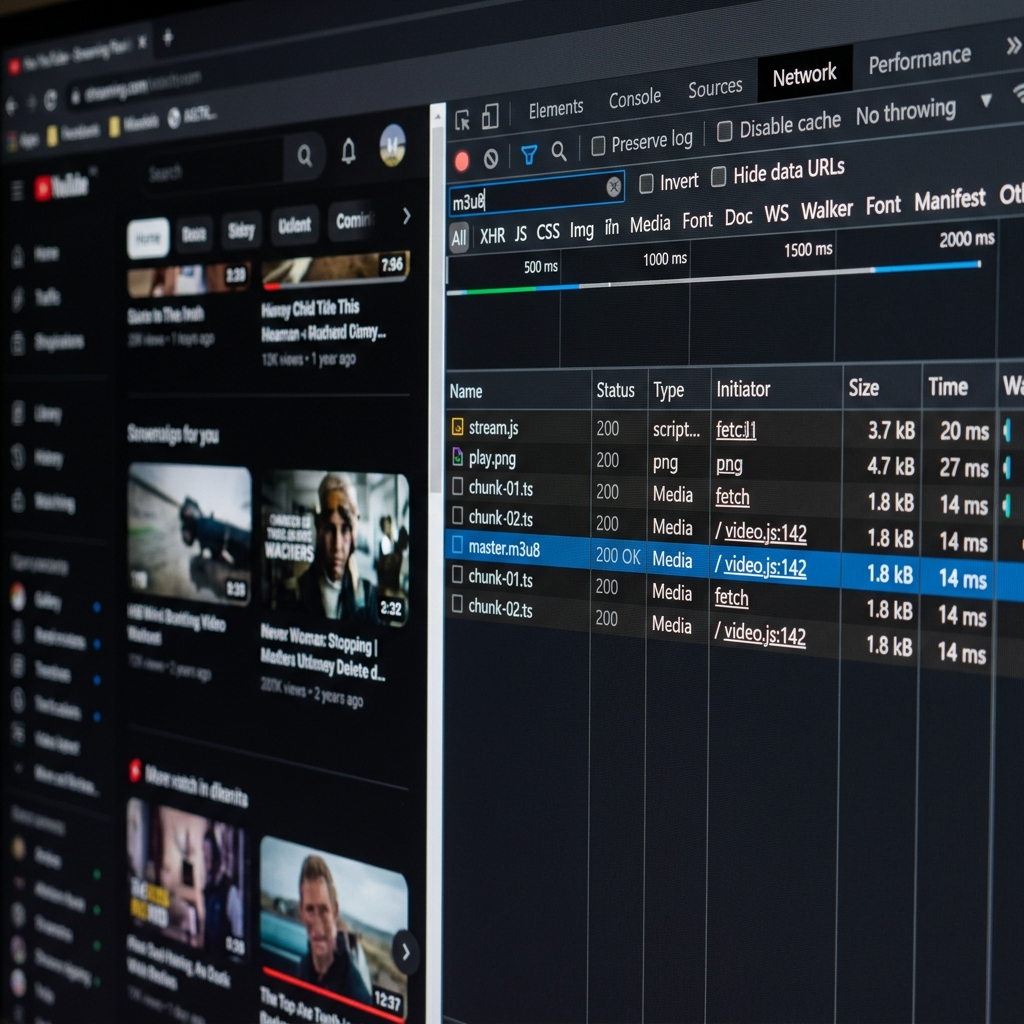 This is what your F12 Console looks like when you successfully catch an m3u8 link.
- Copy It: Right-click that file -> Copy -> Copy Link Address.
✅ Boom! You now have a 100% pure, ad-free streaming link!
🚀 A Minor Pitfall (CORS & Tokens)
Some websites try to be smart. They might attach a temporary Token to the link (making it expire in 2 hours), or they might actively block other websites from playing their video (a security measure known as CORS).
But don't worry! UFlix was built specifically to solve this. With its built-in Proxy Mode, UFlix acts as a secure bridge, bypassing CORS restrictions and delivering the video to your screen flawlessly.
🎬 Action Time!
Now that you know the secret, go test it out! Tonight, visit your favorite streaming site, press F12, extract the .m3u8 link, and paste it directly into your UFlix app. Welcome to a premium, ad-free, buffer-free viewing experience!
🤔 Did it work for you? Let us know in the comments if you successfully managed to extract a link! If you found a site that is too hard to extract manually, drop a comment. Next time, I'll teach you how to write an automated Chrome Extension to do it for you!